Techedge 3E2 wideband system
The 3E2 wideband system delivers a display, extensive auxilliary inputs for analogue sensors, thermocouples and speed sensor and onboard memory for datalogging all in a single box. The package includes the latest Bosch 7200 sensor.
- Inbuilt 4 digit display
- Accuracy within 0.1 AFR (Lambda +/- 0.005).
- 1MB of onboard memory for datalogging
- Configurable wideband 5 Volt output (12 bit accuracy).
- Simulated narrowband output
- 3 analogue 0 to 5 Volt inputs sampled at up to 40/sec.
- 4 thermocouple inputs (can be converted to analogue inputs).
- RPM input from Tacho or ECU for logging.
- ALARM output with configurable software triggers, for shift lights, buzzers etc.
- 5 volt output for powering external sensors such as MAP or TPS.
- Auto-cal button, one-touch calibration (with sensor in free-air).
- USB and serial ports for connection to your PC or data logger
- 10.5 to 19.5 Volt DC operation.
- Compatible with LSU 4.0/4.2 (Bosch 6066/7057 family) or NTK (L1H1/L2H2) sensor.
3E2 Inputs & Outputs

3E2 features two 10 pin removable I/O connectors on one side of the case. The status LEDs and function buttons are at the top of the case,
On the top of the case (with the sticker) can be found ..
- Status LED - Displays information about sensor function, and indicates errors and alarm conditions.
- Heater LED - indicates the amount of power the sensor heater is drawing.
- Logging LED - on models with logging functionality.
- LOG Button - Some displays can also control the logging function provided by this button. A standard 1 Mbyte of logging memory is enough for tens of minutes of recording time.
- DSP Button - On models fitted with an integrated display, this button changes the configurable display 'views', typically between Lambda, AFR, RPM etc.
- CAL Button - When held down, initiates the Auto-cal sequence (indicated by a series of sharp flashes on the logger LED) .
The end of the case carries the sensor cable connector, the power connector and USB connector.
- Sensor Cable Connectors - these connect to a range of sensor types, with the recommended sensor being a low cost LSU 4.2 sensor from Bosch. Cables for each sensor family and connector type are used to customize the unit to the sensor Firmware and jumper settings may also need changing.
- Power connector - is normally wired to the vehicle's power via a high current (5 Amp) in-line fuse and then to a switched power point. Power is normally made available when the ignition is switched to ON. We discourage temporary installations using a cigarette lighter because the sensors should always be powered when exposed to exhaust gasses.
- USB port - the USB port works like a fast serial port and even appears to an attached PC as an additional serial port. This feature ensures total compatibility with existing software without sacrificing speed. Units without internal logging may have a second RJ45 fitted rather than a USB port.
The side of the case carries the two 10 pin connectors, the RJ11 and RJ45 connectors.
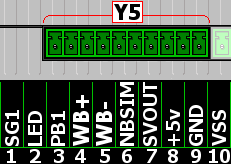
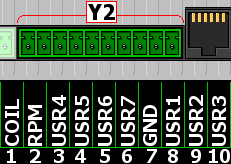
- 10 pin Connectors - These are explained in detail below, and provide convenient pluggable screw terminal connections for outputs (WBlin, NBsim, etc.), as well as inputs (User 0-5v inputs, Thermocouples, RPM). .
- RJ11 Connector - Intended for use with a future intelligent display.
- RJ45 Connector - Provides a connection for external displays, and RS232 communications with a PC using the serial port. Units without internal logging may have a second RJ45 fitted rather than a USB port..
!
<<
|
|